Algorithm metadata#
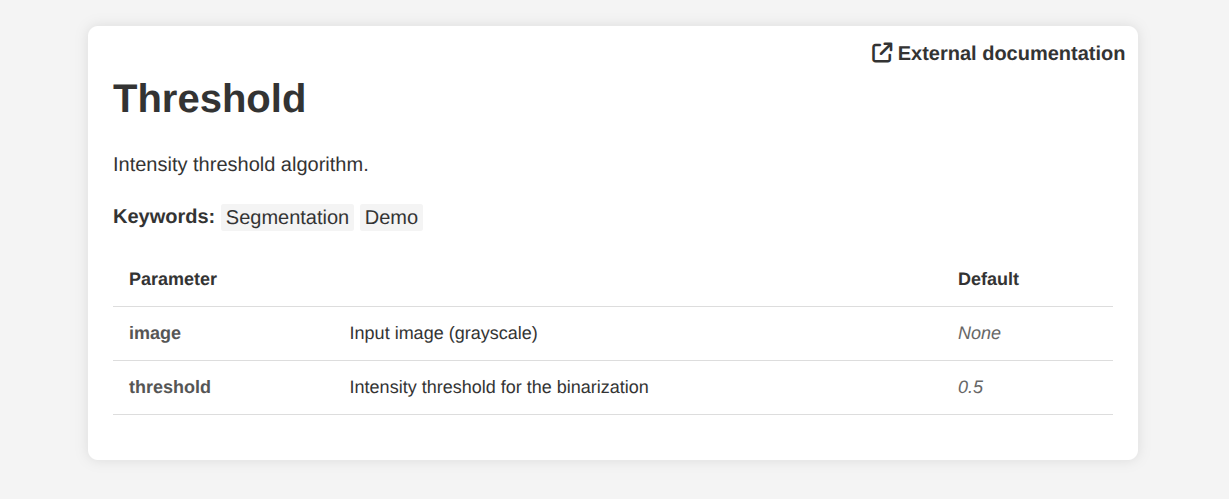
Every algorithm in Imaging Server Kit automatically generates a documentation page describing its purpose and parameters. This page is populated from metadata fields provided in the @sk.algorithm decorator.
Here is an example:
import imaging_server_kit as sk

@sk.algorithm(
    parameters={
        "image": sk.Image(
            name="Image",
            description="Input image (grayscale)",
        ),
        "threshold": sk.Float(
            name="Threshold",
            description="Intensity threshold for the binarization",
            default=0.5,
        ),
    },
    name="Threshold",
    description="Intensity threshold algorithm.", # <- A short description
    tags=["Segmentation", "Demo"],  # A list of tags (arbitrary)
    project_url="https://github.com/Imaging-Server-Kit/imaging-server-kit",
)
def threshold_algo(image, threshold):
    mask = image > threshold
    return sk.Mask(mask)

threshold_algo.info()  # <- Open the doc page in a web browser
In Napari, you can open the documentation page of an algorithm in a web browser by clicking on the 🌐 Doc button. Alternatively, you can call .info() on the algorithm object itself for the same effect.
Summary#
You can include algorithm metadata through fields like
name,description,tagsandproject_url.This metadata automatically populates a documentation web page for the algorithm, which you can access from Python or Napari.
Next steps#
In the next section, we will cover how to combine multiple algorithms to be able to use them together more easily.