Usage with Napari
Imaging Server Kit can generate Napari dock widgets for algorithms, algorithm collections, and algorithm servers.
Note
Install the Napari extra first: pip install "imaging-server-kit[napari]".
Opening a widget
From the Napari plugin menu
The Imaging Server Kit plugin adds a few entries to the Plugins > Imaging Server Kit menu:
| Connect to server | A widget that connects to an algorithm server |
| Demo algorithms | The demo algorithms (same as serverkit demo napari) |
| Tool algorithms | The built-in algorithms (same as serverkit tools napari) |
| Connect to QuPath | The QuPath bridge |
To start Napari with the Connect to server widget already open, run:
From Python
You can pass an algorithm, an algorithm collection, or a client to sk.to_napari. This will add the widget to a new viewer and return that viewer:
To add the widget to an existing viewer instead, pass it with viewer=:
Tip
Calling napari.run() is needed in Python scripts to keep the viewer open (but not in Jupyter notebooks or IPython).
Widget overview
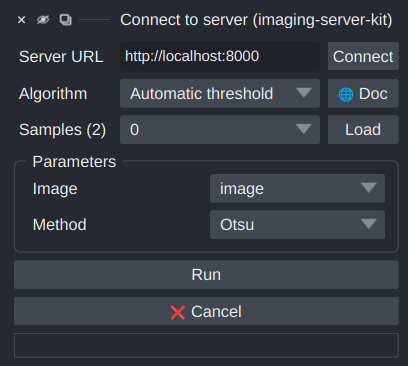
From top to bottom, the widget contains:
- Server URL: the address of the algorithm server (used when connecting to a server).
- Algorithm: a dropdown to select the algorithm (and access its
🌐 Docpage). - Samples: a dropdown to select and load samples into the viewer (only visible when there are samples).
- Parameters: one input field per parameter, generated from the parameter annotations.
- Tiled inference (when the algo has set
tileable=True): run the algorithm tile-by-tile. - Run and ❌ Cancel, and a progress bar.
Parameter fields
| Parameter layer | Field |
|---|---|
sk.Integer, sk.Float |
Spin box, using min, max, step, and default |
sk.Bool |
Checkbox |
sk.Choice |
Dropdown of the items |
sk.String |
Text field |
sk.Image, sk.Mask, sk.Points, sk.Boxes, sk.Vectors, sk.Paths, sk.Tracks |
Dropdown of the matching layers in the viewer |
sk.Any, sk.Null |
Not shown |
The name of a parameter is used as its label, and its description is shown as a tooltip.
When a parameter has auto_call=True, changing its value re-runs the algorithm.
Results in the viewer
Each output layer is shown in the viewer according to its type:
| Output layer | Shown as |
|---|---|
sk.Image |
Image layer |
sk.Mask |
Labels layer |
sk.Points |
Points layer |
sk.Boxes, sk.Paths |
Shapes layer |
sk.Vectors |
Vectors layer |
sk.Tracks |
Tracks layer |
sk.Float, sk.Integer, sk.Bool, sk.String, sk.Choice |
Text overlay |
sk.Notification |
Napari notification (info, warning, or error) |
sk.Progress |
The widget's progress bar |
Notice that when the algorithm runs again, layers with the same name are updated rather (they are not added again).
Extra keyword arguments of output layers are applied as properties of the Napari layer. For example, sk.Image(data, colormap="viridis") sets the colormap of the Napari Image layer.
Sending results to a viewer from Python
You can also run algorithms from Python and display the results in Napari:
algo.run(..., stack=viewer)adds the results to an existing viewer.sk.convert(stack, to="napari")opens a new viewer showing a stack.
Usage in Napari plugins
sk.to_qwidget(algo, viewer) returns the widget without adding it to a viewer. This can be used to integrate Imaging Server Kit algorithms in other Napari plugins.