Usage with QuPath
Imaging Server Kit can run algorithms on QuPath images through QuBaLab, for segmentation and object detection tasks. Computations run inside a rectangular region defined by a QuPath annotation, and the results are directly sent back to QuPath.
Work in progress
The QuPath integration is still experimental. It also supports a narrower set of algorithms than Napari.
Requirements
- The QuPath extra:
pip install "imaging-server-kit[qupath]"(Python 3.11 or later). - The qupath-extension-py4j extension installed in QuPath.
Compatible algorithms
Algorithms used from QuPath must take exactly one sk.Image as input, which is interpreted as the current QuPath image. They run on the full-resolution image, inside the region of interest. Outputs that QuPath can display include segmentation masks (sk.Mask, converted to polygon annotations) and bounding boxes (sk.Boxes).
Connecting to an algorithm server
In this walkthrough, we will use the demo server, but any algorithm server will work.
-
Start the demo server:
-
In a QuPath project:
- Open an image, for example
blobs.tif. - Draw a rectangular annotation around a region of interest (or press
Ctrl+Shift+Ato select the whole image). - Assign a class to this annotation from the QuPath Annotations menu, for example
Region.
- Open an image, for example
-
Start a Py4J gateway from QuPath with the qupath-extension-py4j (you can specify a token and port if needed).
-
In another terminal, open the QuPath connection panel:
This opens a window similar to the Napari widget, with an extra section for connecting to QuPath.
-
Click Connect to QuPath. The Annotation dropdown fills with the annotation class names, such as
Region. -
With the server still running at http://localhost:8000, click Connect to list the algorithms available on the server. You can pick one and run it; the results should appear in QuPath.
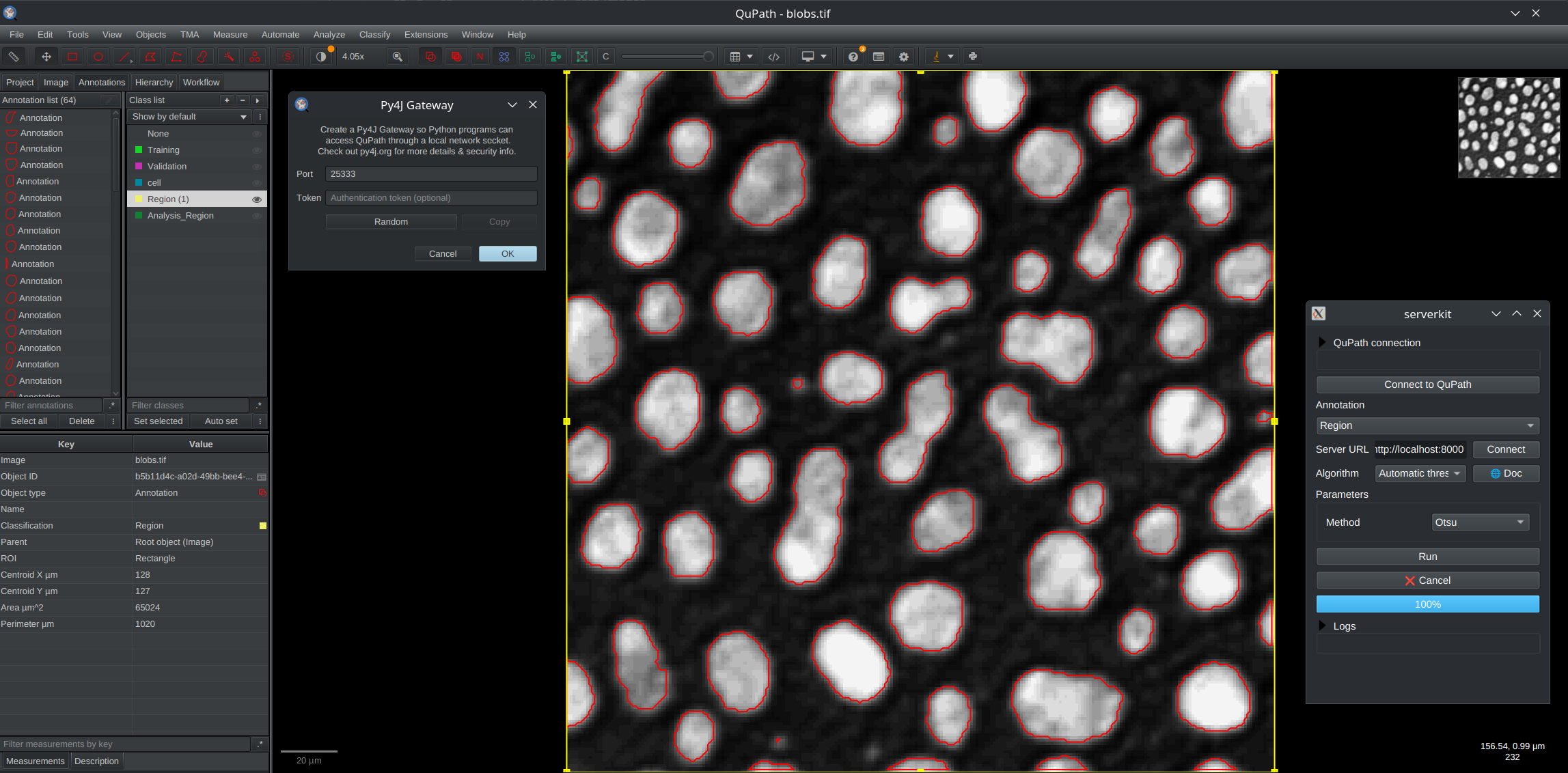
You can also collect and display results in a Napari viewer (for example outputs that cannot be displayed in QuPath). For this, you can try running serverkit qupath --with-napari.
Running a local algorithm
You can also open the QuPath panel to run a local algorithm, without a server, with sk.to_qupath (a Py4J gateway must be running in QuPath). For example:
import imaging_server_kit as sk

@sk.algorithm(tileable=True)
def threshold_manual(image, threshold: float = 0.5):
    thresh_rel = threshold * (image.max() - image.min())
    mask = image > thresh_rel
    return sk.Mask(mask)

if __name__ == "__main__":
    sk.to_qupath(threshold_manual)  # <- "sk.to_qupath"
sk.to_qupath also accepts algorithm collections and clients. Use port= and token= to match the settings of the Py4J gateway, and viewer= to optionally spawn and collect results in a Napari viewer along with the QuPath viewer.